Monster Scripts: Difference between revisions
From Gothongs Wiki
Jump to navigationJump to search
No edit summary |
No edit summary |
||
| (4 intermediate revisions by the same user not shown) | |||
| Line 24: | Line 24: | ||
# Interacts (E) will only be sent to a script called got LocalConf. But we can add a script alias to our monsterscript. Before #include "got_mods/pandamod/_core.lsl" you must put #define SCRIPT_ALIASES ["got LocalConf"] | # Interacts (E) will only be sent to a script called got LocalConf. But we can add a script alias to our monsterscript. Before #include "got_mods/pandamod/_core.lsl" you must put #define SCRIPT_ALIASES ["got LocalConf"] | ||
# Find the "// Put your initialization code in here" comment and below it put: Status$monster_overrideDesc("D$Hello!$$STDIN"); | # Find the "// Put your initialization code in here" comment and below it put: Status$monster_overrideDesc("D$Hello!$$STDIN"); | ||
# Replace the link message handler with:<pre> | # Replace the link message handler with: | ||
<pre> | |||
// Standard in | // Standard in | ||
#include "xobj_core/_LM.lsl" | #include "xobj_core/_LM.lsl" | ||
| Line 40: | Line 41: | ||
== 3. Using the walk helper to create a path for your NPC == | == 3. Using the walk helper to create a path for your NPC == | ||
Monsters walking along a path in GoThongs is done with a monsterscript using llSetKeyframedMotion. But there is a built in walk helper to help you with it! | |||
<ol> | |||
<li> Click the Path button on the dev HUD.</li> | |||
<li> Spawn the monster that you want to walk as a dummy, such as the goblin that we created in the previous step.</li> | |||
<li> Enter build mode and select the goblin. Copy the position and rotation by clicking the C buttons next to Position and Rotation.</li> | |||
<li> Select the path box and paste the position and rotation by clicking the P Button next to Position and Rotation.[[File:Path box.png|none|thumb]]</li> | |||
<li> Click the path button to set the starting position. It will say in chat "Start pos SET"</li> | |||
<li> The next steps are easier to do if you change the axis in the build tools to Local.</li> | |||
<li> Drag the monster forward a bit and click the box to save a point. | |||
[[File:Monster box A.jpg|frameless]] | |||
</li> | |||
<li> Rotate the monster and drag it a little bit forward. Then click it again to save that point. The short distance forward is needed because every step will tween both position AND rotation. And that looks bad if it tweens the rotation over the entire distance that it is walking. | |||
[[File:Monster box B.jpg|frameless]] | |||
</li> | |||
<li> Drag it forward some more and click again. This will be enough points for this tutorial. | |||
[[File:Monster box C.jpg|frameless]] | |||
</li> | |||
<li> Say WA in chat to have the path box generate code for you. In my case the output was this: | |||
<pre> | |||
[ | |||
<0,-2.445,0>,NormRot(<0,0,0,1>),2.444, | |||
<.177,0,0>,NormRot(<0,0,.707,.707>),.178, | |||
<3.551,0,0>,NormRot(<0,0,0,1>),3.556 | |||
] | |||
Timeout: 6.178000 | |||
</pre></li> | |||
<li> We can use the list that it generated to build the path. Let us edit the ms Goblin script in the level again and replace the llOwnerSay("I have been interacted with!"), with the following: | |||
<pre> | |||
Status$monster_overrideDesc(""); | |||
llSetKeyframedMotion([ | |||
<0,-2.445,0>,NormRot(<0,0,0,1>),2.444, | |||
<.177,0,0>,NormRot(<0,0,.707,.707>),.178, | |||
<3.551,0,0>,NormRot(<0,0,0,1>),3.556 | |||
], []); | |||
multiTimer(["STOP", 0, 6.178000, FALSE]); | |||
AniAnim$restart("walk"); | |||
</pre></li> | |||
<li> This code removes the interact, starts a keyframed motion, sets a timer called "STOP" with data 0 to fire after 6.178 seconds and not repeat and starts the "walk" animation.</li> | |||
<li> Finally we must add a handler in the multiTimerEvent for "STOP": | |||
<pre> | |||
if( id == "STOP" ){ | |||
AniAnim$stop("walk"); | |||
} | |||
</pre></li> | |||
<li> Spawn the monster live. Interact with it to see it walk the path that you made and then stop.</li> | |||
</ol> | |||
== The completed script == | |||
Here is what my ms Goblin script looked like when completed:<pre> | |||
/* | |||
This is a generic script that can be remoteloaded into a monster or asset | |||
*/ | |||
// We need the project and to listen for events | |||
#define USE_EVENTS | |||
#define SCRIPT_ALIASES ["got LocalConf"] | |||
#include "got_mods/pandamod/_core.lsl" | |||
key aggro; | |||
float HP = 1; | |||
list AGGRO; | |||
integer TEAM; | |||
#define runOnAggro(pkey, code) {integer i; for(i=0; i<llGetListLength(PLAYERS); i++){key pkey = llList2Key(AGGRO, i); code}} | |||
integer AG; | |||
Portal$playerLists | |||
onEvt(string script, integer evt, list data){ | |||
Portal$handlePlayerLists(); | |||
if(script == "got Monster" && evt == MonsterEvt$confIni){ | |||
// Put your initialization code in here | |||
Status$monster_overrideDesc("D$Hello!$$STDIN"); | |||
} | |||
else if(script == "got NPCSpells"){ | |||
if(evt == NPCSpellsEvt$SPELLS_SET && l2s(data, 0) == "got LocalConf"){ | |||
/* | |||
// Unquote to override spells. See got LocalConf in a monster for more info. | |||
list SPELLS = []; | |||
NPCSpells$setSpells(SPELLS); | |||
*/ | |||
} | |||
// A spell cast has finished | |||
else if(evt == NPCSpellsEvt$SPELL_CAST_FINISH) | |||
onSpellFinish(l2i(data, 0), l2s(data, 2)); | |||
} | |||
else if(script == "got Status"){ | |||
// Monster aggro target changed | |||
if(evt == StatusEvt$monster_gotTarget){ | |||
aggro = l2s(data,0); | |||
/* | |||
if(!AG){ | |||
runOnPlayers(targ, | |||
) | |||
AG = TRUE; | |||
} | |||
*/ | |||
} | |||
// Monster HP changed | |||
else if(evt == StatusEvt$monster_hp_perc){ | |||
float hp = l2f(data, 0); | |||
/* | |||
// Do something when HP goes under 50% | |||
if(hp < 0.5 && HP >= 0.5){ | |||
} | |||
*/ | |||
HP = hp; | |||
} | |||
// Monster has the no death flag set and reached 0 HP | |||
else if(evt == StatusEvt$death_hit){ | |||
} | |||
// A list of all players in combat with this monster | |||
else if(evt == StatusEvt$monster_aggro){ | |||
AGGRO = data; | |||
} | |||
else if(evt == StatusEvt$team) | |||
TEAM = l2i(data, 0); | |||
} | |||
} | |||
onSpellFinish(integer spell, key hud){ | |||
} | |||
timerEvent(string id, string data){ | |||
integer nr = (integer)data; | |||
float next; | |||
string text; | |||
string sound; | |||
if( id == "STOP" ){ | |||
AniAnim$stop("walk"); | |||
} | |||
if(text){ | |||
runOnPlayers(targ, | |||
Language$common(targ, text, sound, 0.5); | |||
) | |||
} | |||
if(next) | |||
multiTimer([id, nr+1, next, FALSE]); | |||
} | |||
default | |||
{ | |||
state_entry() | |||
{ | |||
// script init is required for portal to initialize | |||
raiseEvent(evt$SCRIPT_INIT, ""); | |||
// Here we listen to our level's channel, you should specify your own | |||
llListen(69, "", "", ""); | |||
llOwnerSay("The monster script spawned successfully!"); | |||
} | |||
listen(integer chan, string name, key id, string message){ | |||
// This is important, limit to the level owner | |||
if(llGetOwnerKey(id) != llGetOwner())return; | |||
} | |||
// libjas multi timer | |||
timer(){multiTimer([]);} | |||
// Standard in | |||
#include "xobj_core/_LM.lsl" | |||
if( method$isCallback ) | |||
return; | |||
if( METHOD == LocalConfMethod$stdInteract ){ | |||
Status$monster_overrideDesc(""); | |||
llSetKeyframedMotion([ | |||
<0,-2.445,0>,NormRot(<0,0,0,1>),2.444, | |||
<.177,0,0>,NormRot(<0,0,.707,.707>),.178, | |||
<3.551,0,0>,NormRot(<0,0,0,1>),3.556 | |||
], []); | |||
multiTimer(["STOP", 0, 6.178000, FALSE]); | |||
AniAnim$restart("walk"); | |||
} | |||
#define LM_BOTTOM | |||
#include "xobj_core/_LM.lsl" | |||
} | |||
</pre> | |||
[[Category:Tutorials]] | [[Category:Tutorials]] | ||
Latest revision as of 12:38, 15 April 2024
Monster scripts are scripts that are injected into monsters on demand inside levels. The monster scripts are custom and stored inside of each level.
A good template of a monster script can be found in ms MonsterScript which is included with the developer tools.
You can make a monster script any way you want! The only requirement is that you raise the SCRIPT_INIT event once your script is ready to go. In the template this is added to the state_entry event handler: raiseEvent(evt$SCRIPT_INIT, "");
1. Adding a monster script to the level
- Edit the level and create a new script. To make it easy to distinguish you should start the script name with "ms ". Like "ms Goblin".
- Set the script to full perm (mod/copy/transfer).
- Open the script and uncheck the Running box.
- Copy the contents from ms MonsterScript to your ms Goblin script.
- In state entry add llOwnerSay("The monster script loaded successfully!");
- Rez a goblin or some other NPC by saying: spawn Cock Goblin 2
- Set its description to: $[["SC","ms Goblin"]]
- Create a spawn entry by saying: add
- Spawn the monster as live. If you did everything right you will get a chat message saying that the script loaded successfully.
- What you do with the monster script is up to you. It can interact with all events and run methods on the scripts involved with NPCs. Like got Monster or got Status. The methods and events are defined in the script header files: https://github.com/JasXSL/GoThongs/tree/master/classes
2. Interacting with an NPC
- Let us use a monster script called "ms Goblin". We set the monster description to $[["SC","ms Goblin"],[0,8664]] You can edit an existing description by finding its id by saying listSpawns. If you created a goblin in the last section you can replace its spawn description by finding its id. In my case the ID of my goblin was 7. So I say setSpawnVal 7 4 [["SC","ms Goblin"],[0,8662]]
- The 0 task means to set a bitwise combination of monster flags. The flags 8664 Monster$RF_NOAGGRO, Monster$RF_FREEZE_AGGRO, Monster$RF_INVUL, Monster$RF_NO_TARGET, Monster$RF_NO_SPELLS, Monster$RF_ANIMESH. This means that the monster cannot aggro, it is invulnerable, it cannot be targeted by players, it cannot use spells, and it is animesh. The animesh flag is required for animesh monsters because they use X forward instead of the old monsters that use Z forward.
- Interacts (E) will only be sent to a script called got LocalConf. But we can add a script alias to our monsterscript. Before #include "got_mods/pandamod/_core.lsl" you must put #define SCRIPT_ALIASES ["got LocalConf"]
- Find the "// Put your initialization code in here" comment and below it put: Status$monster_overrideDesc("D$Hello!$$STDIN");
- Replace the link message handler with:
// Standard in
    #include "xobj_core/_LM.lsl"
    if( method$isCallback )
        return;
    if( METHOD == LocalConfMethod$stdInteract ){
        llOwnerSay("I have been interacted with!");
    }
    #define LM_BOTTOM
    #include "xobj_core/_LM.lsl"
- Compile the script and spawn your monster live.
- If you did it correct you can now press E on the monster to interact with it. Doing so will output your "I have been interacted with!" message.
- You can remove interactivity from a monster by running Status$monster_overrideDesc("");
3. Using the walk helper to create a path for your NPC
Monsters walking along a path in GoThongs is done with a monsterscript using llSetKeyframedMotion. But there is a built in walk helper to help you with it!
- Click the Path button on the dev HUD.
- Spawn the monster that you want to walk as a dummy, such as the goblin that we created in the previous step.
- Enter build mode and select the goblin. Copy the position and rotation by clicking the C buttons next to Position and Rotation.
- Select the path box and paste the position and rotation by clicking the P Button next to Position and Rotation.
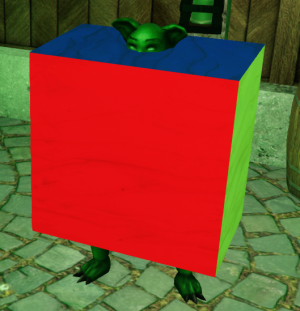
- Click the path button to set the starting position. It will say in chat "Start pos SET"
- The next steps are easier to do if you change the axis in the build tools to Local.
- Drag the monster forward a bit and click the box to save a point.

- Rotate the monster and drag it a little bit forward. Then click it again to save that point. The short distance forward is needed because every step will tween both position AND rotation. And that looks bad if it tweens the rotation over the entire distance that it is walking.

- Drag it forward some more and click again. This will be enough points for this tutorial.
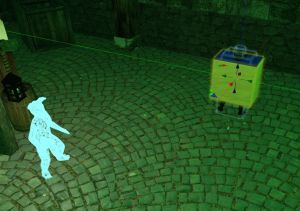
- Say WA in chat to have the path box generate code for you. In my case the output was this:
[
 <0,-2.445,0>,NormRot(<0,0,0,1>),2.444,
 <.177,0,0>,NormRot(<0,0,.707,.707>),.178,
 <3.551,0,0>,NormRot(<0,0,0,1>),3.556
]
Timeout: 6.178000
- We can use the list that it generated to build the path. Let us edit the ms Goblin script in the level again and replace the llOwnerSay("I have been interacted with!"), with the following:
Status$monster_overrideDesc(""); llSetKeyframedMotion([ <0,-2.445,0>,NormRot(<0,0,0,1>),2.444, <.177,0,0>,NormRot(<0,0,.707,.707>),.178, <3.551,0,0>,NormRot(<0,0,0,1>),3.556 ], []); multiTimer(["STOP", 0, 6.178000, FALSE]); AniAnim$restart("walk"); - This code removes the interact, starts a keyframed motion, sets a timer called "STOP" with data 0 to fire after 6.178 seconds and not repeat and starts the "walk" animation.
- Finally we must add a handler in the multiTimerEvent for "STOP":
if( id == "STOP" ){ AniAnim$stop("walk"); } - Spawn the monster live. Interact with it to see it walk the path that you made and then stop.


The completed script
Here is what my ms Goblin script looked like when completed:
/*

    This is a generic script that can be remoteloaded into a monster or asset

*/
// We need the project and to listen for events
#define USE_EVENTS
#define SCRIPT_ALIASES ["got LocalConf"]
#include "got_mods/pandamod/_core.lsl"

key aggro;
float HP = 1;
list AGGRO;
integer TEAM;
#define runOnAggro(pkey, code) {integer i; for(i=0; i<llGetListLength(PLAYERS); i++){key pkey = llList2Key(AGGRO, i); code}}
integer AG;

Portal$playerLists
onEvt(string script, integer evt, list data){
    Portal$handlePlayerLists();


    if(script == "got Monster" && evt == MonsterEvt$confIni){

        // Put your initialization code in here
        Status$monster_overrideDesc("D$Hello!$$STDIN");

    }

    else if(script == "got NPCSpells"){
        if(evt == NPCSpellsEvt$SPELLS_SET && l2s(data, 0) == "got LocalConf"){
            /*
            // Unquote to override spells. See got LocalConf in a monster for more info.

            list SPELLS = [];

            NPCSpells$setSpells(SPELLS);
            */
        }
        // A spell cast has finished
        else if(evt == NPCSpellsEvt$SPELL_CAST_FINISH)
            onSpellFinish(l2i(data, 0), l2s(data, 2));
    }

    else if(script == "got Status"){
        // Monster aggro target changed
        if(evt == StatusEvt$monster_gotTarget){
            aggro = l2s(data,0);
            /*
            if(!AG){
                runOnPlayers(targ,

                )
                AG = TRUE;
            }
            */
        }
        // Monster HP changed
        else if(evt == StatusEvt$monster_hp_perc){
            float hp = l2f(data, 0);
            /*
            // Do something when HP goes under 50%
            if(hp < 0.5 && HP >= 0.5){

            }
            */
            HP = hp;
        }
        // Monster has the no death flag set and reached 0 HP
        else if(evt == StatusEvt$death_hit){

        }
        // A list of all players in combat with this monster
        else if(evt == StatusEvt$monster_aggro){
            AGGRO = data;
        }
        else if(evt == StatusEvt$team)
            TEAM = l2i(data, 0);

    }

}

onSpellFinish(integer spell, key hud){

}
timerEvent(string id, string data){

    integer nr = (integer)data;
    float next;
    string text;
    string sound;


    if( id == "STOP" ){
        AniAnim$stop("walk");
    }


    if(text){

        runOnPlayers(targ,

            Language$common(targ, text, sound, 0.5);

        )

    }

    if(next)
        multiTimer([id, nr+1, next, FALSE]);

}

default
{
    state_entry()
    {
        // script init is required for portal to initialize
        raiseEvent(evt$SCRIPT_INIT, "");
        // Here we listen to our level's channel, you should specify your own
        llListen(69, "", "", "");
        llOwnerSay("The monster script spawned successfully!");
    }

    listen(integer chan, string name, key id, string message){
        // This is important, limit to the level owner
        if(llGetOwnerKey(id) != llGetOwner())return;

    }

    // libjas multi timer
    timer(){multiTimer([]);}

    // Standard in
    #include "xobj_core/_LM.lsl"
    if( method$isCallback )
        return;
    if( METHOD == LocalConfMethod$stdInteract ){

        Status$monster_overrideDesc("");
        llSetKeyframedMotion([
         <0,-2.445,0>,NormRot(<0,0,0,1>),2.444,
         <.177,0,0>,NormRot(<0,0,.707,.707>),.178,
         <3.551,0,0>,NormRot(<0,0,0,1>),3.556
        ], []);
        multiTimer(["STOP", 0, 6.178000, FALSE]);
        AniAnim$restart("walk");

    }
    #define LM_BOTTOM
    #include "xobj_core/_LM.lsl"
}
